Hot-Cold Storage Separation in Practice
EIP-8188 adds a consensus-visible timestamp to every account and storage slot, recording when each was last mutated. Its pricing rules use that field to charge more for writing to write-inactive state, but the field itself is the part that matters here because it gives every client the same signal for which state is recently mutated (hot) and which has not been mutated in a long time (cold). The EIP deliberately mandates no storage architecture. It only hands clients the metadata and leaves what to do with it open.
This writeup takes that signal and measures one thing a client can do with it: physically separate cold state from hot, keeping a smaller hot working set in the main database and parking the cold remainder in a cheaper flat file. The question is how much disk that actually saves on a real node, and which way of doing the separation wins.
We ran a three-step experiment on a real mainnet go-ethereum (geth) node to see how much disk you save by pulling “cold” state out of the hot database. This writes up what each step does and what it actually measured.
The three steps:
- Baseline. The normal geth node.
- Period injection. Tag every account and slot with when it was last used, so we can tell what is cold.
- Move inactive state out. Pull the cold parts out of the main database into a flat file, shrinking what the node has to keep hot.
Everything below is measured on one data directory: mainnet at block 19,999,256.
How geth stores the state
The state is every account (balance, nonce, code, storage root) plus every contract’s storage slots. geth keeps it twice inside its key-value store (PebbleDB).
1. Merkle-Patricia Trie (MPT). The authenticated tree whose root hash is the block’s state root.
   account trie  (root hash = stateRoot)
            |
         (branch)
        /        \
  (extension)   (branch)
      |          /     \
   (branch)   (leaf)  (leaf)
    /    \
 (leaf) (leaf)

   every contract account's storage is its own trie of the same shape.
2. The snapshot. A flat key-to-value copy of just the leaves, so a read does not have to walk the tree.
   accountHash             -> account
   accountHash + slotHash  -> slot value
Step 1: baseline
The node at block 19,999,256. Sizes are logical bytes (sum of record contents) unless noted. The physical on-disk compacted PebbleDB is about 251.75 GB.
| component | count | size |
|---|---|---|
| trie nodes (account) | 334.7 M | 38.81 GB |
| trie nodes (storage) | 1,560.7 M | 109.33 GB |
| trie total | 1,895.4 M nodes | 148.13 GB |
| snapshot, account (keys / values) | - | 7.58 / 3.77 GB |
| snapshot, storage (keys / values) | - | 69.74 / 13.32 GB |
| snapshot total | ~1.15 B records | 101.38 GB |
Step 2: period injection
For each account and storage slot, we store the most recent period it was written. This goes only into the snapshot. A “period” is just a time window, here 1,314,000 blocks (about six months). A leaf is inactive if it has not been written for at least minAge periods (here it’s 2, so 1-year inactivity in total).
In this experiment, we used Xatu as the primary data source.
    access-history source                     injector             snapshot (pebble)

   +---------------------+  (key, block)   +-------------+   read -> set period -> write
   | addr A wrote @ blk  | --------------> | period =    |   +---------------------------+
   | slot S wrote @ blk  |                 | (blk - fork)| ->| accountHash -> [acct, P]  |
   | ...                 |                 |   / perLen  |   | slotHash    -> [value, P] |
   +---------------------+                 +-------------+   +---------------------------+
                                                              (only ever raises a period)
ComputePeriod(block) = (block - forkBlock) / blocksPerPeriod. With forkBlock 17,371,256 and blocksPerPeriod 1,314,000, the head sits in period 2. The update only ever raises a record’s period, so the source can emit diffs in any order, in batches, with retries.
How it is stored, and why it barely costs anything. The period is an optional trailing RLP field. When it is 0 (the record was never written in the tracked range) the bytes are identical to a legacy record, so only recently-written records grow.
   account record:
     before:  RLP[ nonce, balance, storageRoot, codeHash ]
     after:   RLP[ nonce, balance, storageRoot, codeHash, period ]   (+1 to 2 bytes)

   storage slot record:
     before:  RLP("value")                a plain string
     after:   RLP[ "value", period ]      a 2-item list  (+2 to 3 bytes)
Cost (step 1 to step 2).
| trie | snapshot | |
|---|---|---|
| change | none, byte-identical | +0.2 to 0.3 GB (on ~32.5 M accounts plus recently-written slots) |
| as % | 0% | under 0.5% of the 101 GB snapshot |
Step 3: move inactive state out
Now that every leaf carries a last-used period (step 2), we can pull the cold parts of the state out of the main database into a flat file, leaving the node a smaller hot working set.
What we move
We look for cold subtrees: a node whose every leaf underneath is inactive (currentPeriod - leafPeriod >= 2, using the periods from step 2). When we find one we take the largest cold subtree we can, under two limits:
- a cap on its height, so one subtree never gets too big. Height is counted from the leaves, so a leaf is height 1, a branch directly above leaves is height 2, and so on, with at most 16^(height-1) leaves under a subtree of that height.
- a floor of height 2, so we never move a lone cold leaf by itself. Moving a single leaf costs a 17-byte stub plus an archive record and saves no interior, a net loss.
   BEFORE (in PebbleDB)                  AFTER

        N (cold subtree root)            N  ->  17-byte stub  --+
       / \                                                      |
  (branch)(branch)   interior nodes      subtree gone from      |
   / \     / \         (deleted)         PebbleDB                v
 leaf leaf leaf leaf  (all inactive)            nodearchive (flat file)
                                                +------------------------+
                                                | [leaf][leaf][leaf] ... |
                                                +------------------------+
What we store, and reading it back
For each moved subtree we write its leaves only to the flat file and replace the whole subtree with a 17-byte pointer:
- The stub, 17 bytes in PebbleDB:
[0x00 marker | fileOffset:8 | size:8]. A real trie node’s first byte is0xc0or higher, so0x00can never be mistaken for one. The offset and size bracket this subtree’s records in the file. - The archive, leaves only: one RLP record per leaf,
[pathToLeaf, leafValue]. No interior nodes, just the leaves and their relative paths. The interior is deleted from PebbleDB. - Reading it back: load the records, re-insert each
(path, value)into a fresh mini-trie. The rebuilt subtree is identical to the original, and its hash has to match the one the stub expects, which doubles as a corruption check.
   access a cold leaf:
     stub(offset, size) -> read records -> rebuild subtree in memory -> use it
Why leaves only: the naive alternative
The naive move-out copies every cold node into the flat file as-is, interior branches and all. It frees the most from the main database, because it relocates everything cold, but the flat file pays for it. We measured both on the same datadir, in logical value bytes so the two are counted the same way:
| naive: every cold node, full structure | ours: cold subtrees, leaves only (cap 3) | |
|---|---|---|
| what lands in the flat file | the whole subtree, interior and all | the leaves only, interior rebuilt on access |
| stubs written | 316.3 M | 239.6 M |
| trie shrinks from 148.1 GB to | 32.7 GB (-115.5) | 58.7 GB (-89.4) |
| flat file | 162.39 GB | 82.96 GB raw / 41.58 GB compressed |
| net total disk | +46.93 GB (goes up) | -6.43 GB raw / -47.81 GB compressed |
The naive approach frees more from the main database (-115 GB of trie against our -89 GB), but its flat file is 162 GB, larger than what it freed, so total disk goes up by about 47 GB. Storing leaves only keeps the flat file small enough that total disk comes down. Dropping the interior and rebuilding it on access is the whole trick.
Finding the cold subtrees
One streaming pass walks the trie and the period-stamped snapshot side by side, rolling the all-inactive answer up from the leaves. When a cold subtree is complete and within the floor and cap, it materialises the subtree, writes the leaf records, stages the stub, and deletes the interior, all in the same pass. The rebuilt-hash check runs before anything is deleted, so a mismatch aborts that one subtree rather than corrupting state.
Compressing the archive
The flat file is raw on disk, but it compresses well. Squeezed in roughly 1 MB chunks, one zstd frame per chunk plus a small offset table, it drops by about half while still letting you rebuild a single subtree by decompressing just its chunk. Compression is the biggest single lever in the whole pipeline, so the results below report both the raw and the compressed archive. Two things that did not work: compressing each leaf or each subtree on its own, because the blocks are too small for zstd to find anything, and a shared dictionary trained on sample records, which moved the number by a couple of points and sometimes made it worse. You have to compress many subtrees together.
Choosing the cap height
The floor of 2 means every cap moves the same leaves. The cap only changes how those leaves are grouped: a taller cap merges a cold region into one big subtree instead of many small ones, which leaves fewer 17-byte stubs behind and deletes more interior, so the main database shrinks more. We swept the cap from 2 to 5, floor fixed at 2:
| cap height | trie reduction | archive (raw) | archive (compressed) | net disk (raw) | net disk (compressed) | subtrees moved | worst-case rebuild (leaves) |
|---|---|---|---|---|---|---|---|
| 2 | -66.93 GB (-45.2%) | 63.35 GB | 31.39 GB | -3.58 GB (-1.4%) | -35.54 GB (-14.1%) | 295.1 M | 16 |
| 3 | -95.86 GB (-64.7%) | 82.96 GB | 41.58 GB | -12.90 GB (-5.1%) | -54.28 GB (-21.6%) | 239.6 M | 73 |
| 4 | -107.37 GB (-72.5%) | 89.19 GB | 44.79 GB | -18.18 GB (-7.2%) | -62.58 GB (-24.9%) | 158.4 M | 295 |
| 5 | -110.03 GB (-74.3%) | 89.98 GB | 45.16 GB | -20.05 GB (-8.0%) | -64.87 GB (-25.8%) | 116.4 M | 1118 |
The two percentages use different baselines. The trie reduction is against the trie size (148.1 GB from step 1), since the move-out only deletes trie nodes and leaves the snapshot alone. The net disk columns are against the full 251.75 GB on-disk footprint.
A taller cap always saves more disk, but the gains shrink fast, each step worth about half the last, while the worst-case rebuild grows the other way:
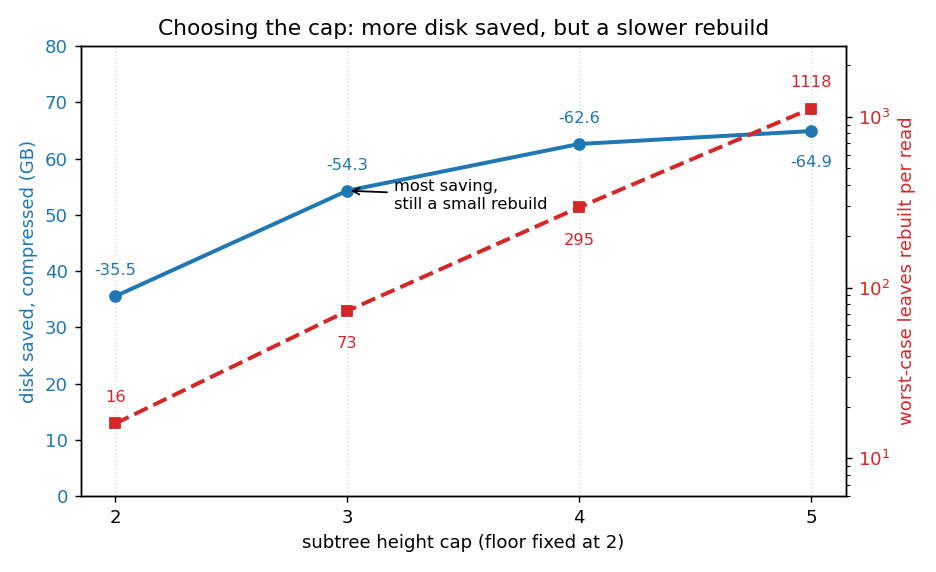
This is the real tradeoff in picking a cap. A greater cap reduces disk further, but every access that touches cold state rebuilds the whole subtree it lands in, and a bigger subtree is a slower rebuild. Cap 2 rebuilds at most 16 leaves, cap 5 up to over a thousand. So the sweet spot is not the deepest cap. Cap 3 is the best balance: it banks most of the disk saving (-54.28 GB out of a possible -64.87 GB at the deepest cap) while keeping the rebuild small, at most 73 leaves. Cap 4 trades another 8 GB for a roughly four times larger rebuild, and cap 5 saves almost nothing for a rebuild past a thousand leaves.
End to end summary
   STEP 1 baseline          STEP 2 period inject        STEP 3 move inactive out
   ---------------          --------------------        ------------------------
   trie     148.1 GB  --->  trie     148.1 GB  (same) -> trie     ~59 GB + 240 M stubs
   snapshot 101.4 GB  --->  snapshot 101.6 GB  (+0.3) -> snapshot 101.6 GB (same)

   no timestamps            every leaf has its          nodearchive 83 GB raw
                            last-used period            (42 GB compressed)
| Step 1 baseline | Step 2 post-inject | Step 3 post-move-out (floor 2 / cap 3, the best balance) | |
|---|---|---|---|
| trie nodes | 1,895.4 M | 1,895.4 M | 788.0 M (-58%) |
| snapshot | 101.38 GB | ~101.6 GB (+under 0.5%) | ~101.6 GB |
| external archive | - | - | 82.96 GB raw / 41.58 GB zstd |
| PebbleDB (physical, compacted) | 251.75 GB | 251.75 GB | 155.89 GB (-95.9 GB) |
| net total disk vs baseline | - | ~+0.3 GB (+0.1%) | -12.90 GB (-5.1%) raw / -54.28 GB (-21.6%) compressed |
What we take from this:
- The move-out shrinks the hot database by deleting cold interior nodes and relocating cold leaves. With the floor 2 / cap 3 rule PebbleDB drops 95.9 GB and the leaves land in a flat file you can park on cheaper storage.
- Total on-disk still shrinks after counting the archive: -12.90 GB raw, and -54.28 GB (about 22%) with the chunked compression. The price is rebuilding a small subtree on a rare access of cold state, at most 73 leaves at this cap.
- The cap height is a tradeoff between disk size and rebuild cost. A deeper cap frees more disk but makes the worst-case rebuild larger, and the disk gains shrink fast while the rebuild cost climbs. Cap 3 is the best balance, cap 4 is more aggressive (more disk, bigger rebuild), and cap 5 is barely worth it.
Open Questions
Performance under real workloads. Everything above is a static footprint measurement. What it does not measure is the performance cost of modifying cold state. Every hit on a cold subtree pays a rebuild: read the leaf records, rebuild the subtree in memory, and hash-check it before returning. That is cheap at a shallow cap, at most 73 leaves at cap 3, but it grows with the cap, to about 300 leaves at cap 4 and over a thousand at cap 5, and it happens on every access to a cold subtree. This is the main reason a deeper cap is not automatically better despite saving more disk.
So the footprint winner is not automatically the workload winner. A design that saves the most disk can still lose if a common access pattern keeps reaching into cold subtrees and paying the rebuild. The experiment we have not run yet is to replay real mainnet blocks, plus some adversarial patterns that deliberately access cold state. Compression adds a second layer here, since a hit on a compressed chunk also pays a decompress of that chunk. Hence, the numbers presented in this document should solely serve as references for storage footprint, and not performance.